Responsive stack viewer
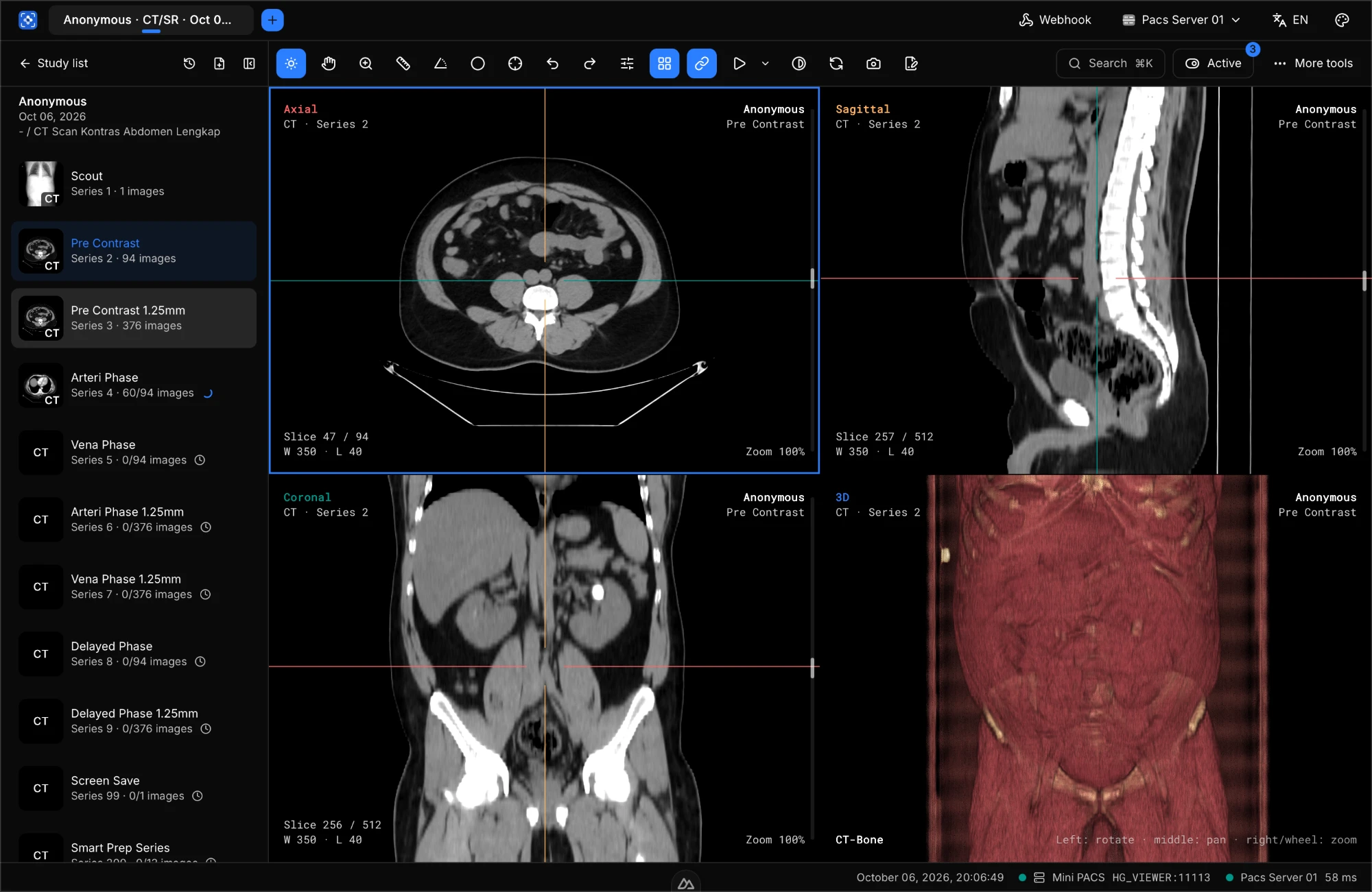
Scroll through slices, window/level, zoom, and pan with the mouse — smooth even on studies with hundreds of slices.
A desktop DICOM viewer for radiologists and clinicians — MPR, 3D reconstruction, segmentation, and radiology reports. Connects to your PACS and straight into the HISGrace SIMRS radiology worklist.
Supports a wide range of modalities & DICOM objects
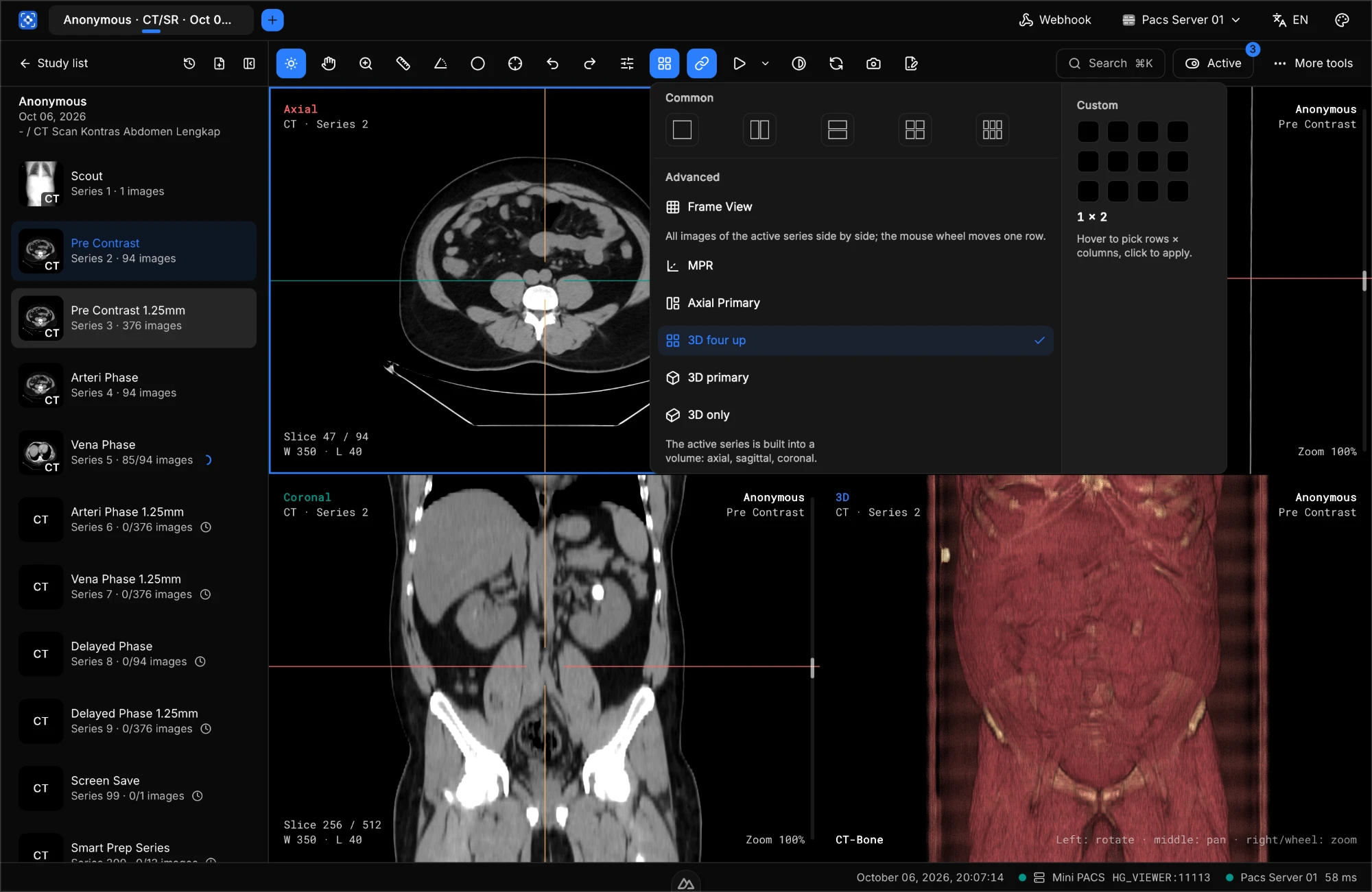
Pick a ready-made layout or build your own grid. The viewer remembers each radiologist's preferences.
Standard & custom grids
1×1 up to 3×3, or choose your own rows × columns.
MPR & Axial Primary
Axial, sagittal, and coronal views synced with reference lines.
3D four up, 3D primary, 3D only
The active series is reconstructed into a 3D volume instantly.
Frame View
Every slice in the series side by side for a quick review.
From opening a patient CD to advanced 3D analysis — all in one lightweight app.
Scroll through slices, window/level, zoom, and pan with the mouse — smooth even on studies with hundreds of slices.
Axial, sagittal, coronal, volume rendering, 3D surfaces, and virtual endoscopy on a single screen.
Length, angle, pixel value, elliptical & rectangular ROIs, arrows, and measurements directly in the 3D view.
Brush, threshold, region growing, and smart region — volume statistics and saving as DICOM SEG.
Write your read straight from the viewer, attach key images, and print letterhead PDF reports.
C-FIND, C-GET, C-MOVE, C-STORE, and DICOMweb — connects to the PACS you already use.
Anonymization, burn-ready DICOMDIR folders, MP4 cine videos, and DICOM film printing.
A permanent archive with search & albums, Query/Retrieve SCP, auto-routing, and sharing between PCs on your LAN.
At hospitals running HISGrace SIMRS, PACS Viewer connects directly to the hospital information system. Studies are automatically matched to radiology orders, and the radiologist's report flows back to the patient's medical record in real time.
Free for hospitals using HISGrace SIMRS
Hospitals already running HISGrace SIMRS can use every Max plan feature at no cost and without a license key.
The doctor places a radiology order in HISGrace SIMRS.
The DICOM worklist is sent automatically to CT, MRI, or X-ray.
The study appears in PACS Viewer, auto-matched to its order.
Results and order status sync to the medical record in real time.
Simple, transparent pricing. Choose the plan that fits your radiology workflow.
For opening, reviewing, and reconstructing DICOM images — no activation needed.
For radiologists and clinics connected to a PACS.
Everything in Free, plus:
For hospital radiology departments with a full workflow.
Free for HISGrace SIMRS users
Hospitals using HISGrace SIMRS get every Max feature at no cost — including the worklist and reports sent straight to the medical record.
Claim it for your hospitalEverything in Pro, plus:
Need licenses for many workstations or an entire radiology department? Contact our team for a hospital-specific quote.
Yes. The Free plan costs nothing, needs no activation, and never expires — open local DICOM files and patient CDs, use every 2D tool, MPR, 3D volume rendering, and even PET-CT fusion display.
No. Hospitals using HISGrace SIMRS can use every Max plan feature for free — including worklist integration and radiology reports sent straight to the medical record. Max features turn on automatically when the viewer signs in with a HISGrace account, with no license key.
One Pro or Max subscription covers one PC. To move to another PC, release the license from the "Release license" menu in the app or the "Release PC" button on your Account page, then activate it on the new PC. During activation you can also move a subscription that is still in use on the old PC.
No. An internet connection is needed for activation; after that the viewer renews its license automatically once a day while online. The license on the PC is valid for 7 days after its last renewal, plus a 7-day offline grace period — during that time Pro/Max features keep working without internet.
The viewer falls back to the Free plan. Studies in the local archive and existing reports can still be opened, searched, and printed — only adding or changing them requires an active subscription.
HISGrace PACS Viewer is a desktop app for Windows, macOS, and Linux.
Yes. Every plan supports the standard DICOM protocols (C-FIND, C-GET, C-MOVE) to connect to your existing PACS: the number of PACS you can connect depends on the plan (see the pricing cards). C-STORE sending to other nodes starts with the Pro plan.
You can upgrade from Free to Pro or Max at any time, billed monthly or yearly (2 months free). From Pro to Max: press "Upgrade to Max" in the app, complete the payment, then activate again and choose the Max subscription. You can cancel your subscription before the next billing period starts.
No. Images are opened directly from your computer, CD, or hospital PACS. For licensing, the server only receives the PC name, operating system, app version, and a hashed PC fingerprint. The app also sends anonymous usage statistics (plan, version, operating system, connection mode, and features used) for product development — no patient data, PC names, or accounts. Connection credentials are stored securely in the operating system keychain.
We'll help you size your workstation needs, integrate with your PACS & modalities, and train your radiologists and radiographers.