Since Indonesia's Ministry of Health Regulation No. 24 of 2022 on Medical Records made electronic medical records mandatory, every hospital needs to connect to SATUSEHAT, the ministry's national health data platform. Many people picture the integration as a one-off job: connect the hospital system, test the connection, done.
In practice, connecting is only the beginning. Whether data actually arrives depends on small things recorded every day at the registration desk, in the clinics, and in the HR department.
Before the first record is sent
Every record sent to SATUSEHAT has to point to identities that SATUSEHAT already knows. So a few things need to be in place first:
- Patients. A patient's SATUSEHAT identity is looked up using their NIK, Indonesia's 16-digit national ID number. Without a correct NIK, the patient's visit cannot be sent.
- Doctors and health workers. Every attending physician needs a SATUSEHAT ID, also looked up from their own NIK. A new doctor who is not yet registered will hold up all of their patients' visits.
- Locations. Clinics, wards, rooms, and even beds need to be registered with SATUSEHAT in their proper hierarchy. A newly opened room has to be registered too.
- Codes. Diagnoses use ICD-10, medicines use KFA codes (Indonesia's national formulary and medical device dictionary), and lab tests use LOINC. A code that has not been mapped means data that cannot be sent in full.
This list looks like IT work. But most of it comes from other departments: patient NIKs from registration, health worker NIKs from HR, and code mappings from pharmacy and the laboratory.
Data follows the workflow
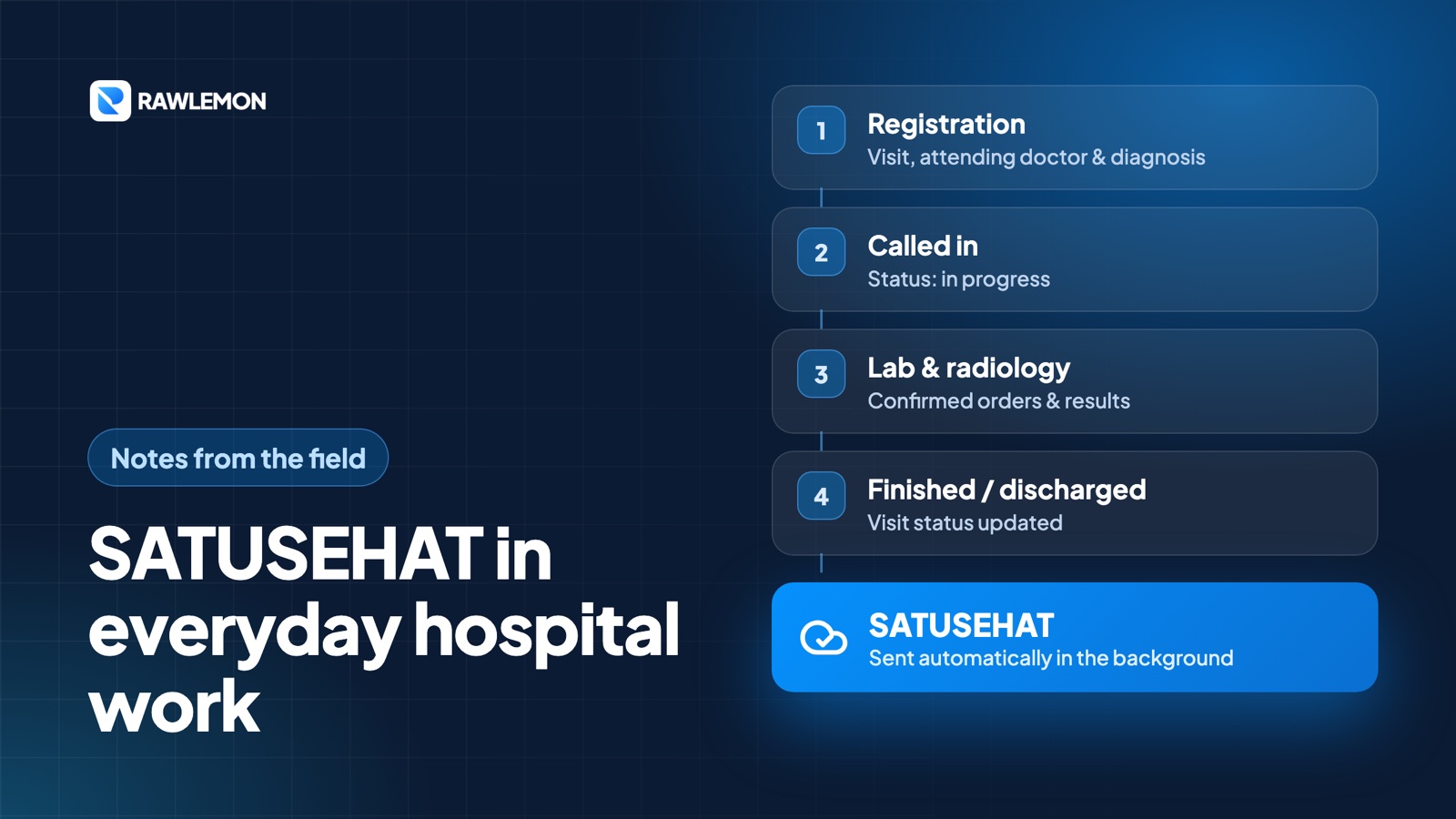
The principle we hold to is simple: staff should never have to enter anything twice just for SATUSEHAT. Data is sent automatically in the background whenever staff save something in the hospital system, following the flow of care:
- when a patient is registered, the visit is sent with the attending physician, the room, and the initial diagnosis;
- when the patient is called in, the visit's status changes to in progress;
- when the service is finished or an inpatient is discharged, the status is updated again — and also when a finish or discharge is cancelled;
- when a lab or radiology order is confirmed, the order is sent;
- when lab and radiology results are confirmed, the results are sent.
Results are deliberately sent only after they are confirmed, not every time they are typed. Until confirmation, results can still change, and data that reaches the national level should be final.
One more thing matters: if sending to SATUSEHAT fails, patient care must not stop with it. Staff can still save and carry on with their work. Whatever failed is flagged to be fixed later.
Common reasons for failure
Almost every failure we see is not about the connection, but about the data at its source:
- The patient's NIK is empty or not 16 digits, for example because a long-time patient was registered before NIKs were required.
- The NIK is not found in SATUSEHAT, because of a single mistyped digit or because the population record is not yet in sync.
- The visit has no attending physician, so it is unclear which doctor is responsible.
- The doctor has no SATUSEHAT ID, usually a doctor or health worker who has just joined.
- The room is not registered, usually a new room or a ward that was recently split.
There are also cases that simply do not fit the normal path, such as newborns who do not yet have their own NIK, or foreign patients. These need special handling, not forcing through with someone else's NIK.
Resending without creating duplicates
When something fails, the first temptation is usually to hit the send button again and again. The problem is that if SATUSEHAT had in fact already accepted the data, the next attempt can be recorded as a new visit, leaving one patient with two visits on the same day.
That is why, in HISGrace SIMRS, every visit and every examination result shows whether it has been sent to SATUSEHAT. A visit that has been accepted stores the number SATUSEHAT returned, and the resend button only appears for those that have not. When resending, staff can see which step failed — patient data, doctor, or location — along with SATUSEHAT's own message, so they know what to fix before trying again. The IT team has its own send log to spot patterns of disruption over time.
Not just an IT matter
If there is one thing we would take away from this experience, it is that SATUSEHAT is not purely an IT project. The quality of the data that reaches the national level is shaped by many people:
- registration staff who make sure each patient's NIK is correct,
- the HR department that records the NIK of every new health worker,
- medical records and IT, who keep room data and codes up to date,
- doctors who make sure every visit has an attending physician and a coded diagnosis.
When all four are in place, the integration is barely noticeable. Data flows behind the scenes, and staff can simply focus on caring for patients.